Email Forwarding is a way of forwarding or sending messages from one address, on to another. It can be useful if you want to have multiple contact addresses for different purposes but you only want to have to check one mailbox for all of the emails. So you could have support@, sales@, billing@ all going through to your email address you@yourdomain.com for example.
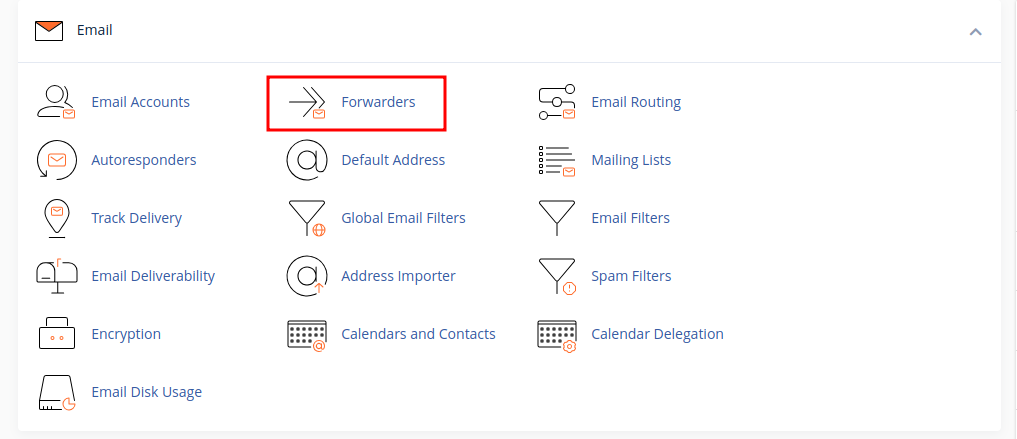
The first step to do this is to log in to your cPanel account, scroll down to the "Email" Tab and click on the "Forwarders" tool. This will open up the page which is responsible for setting up a forwarders or managing existing ones.
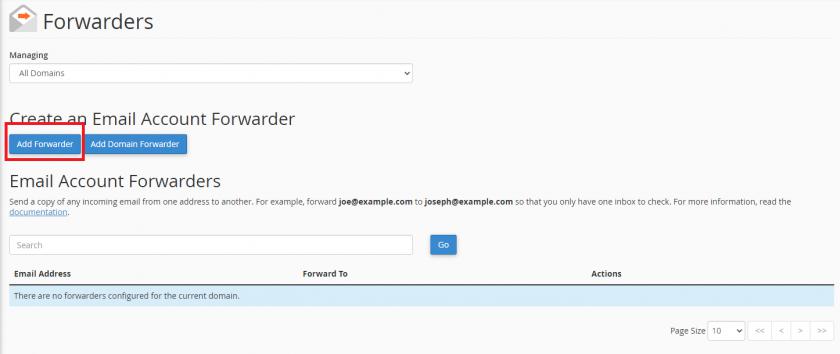
Now you need to click on the "Add Forwarder" button
-
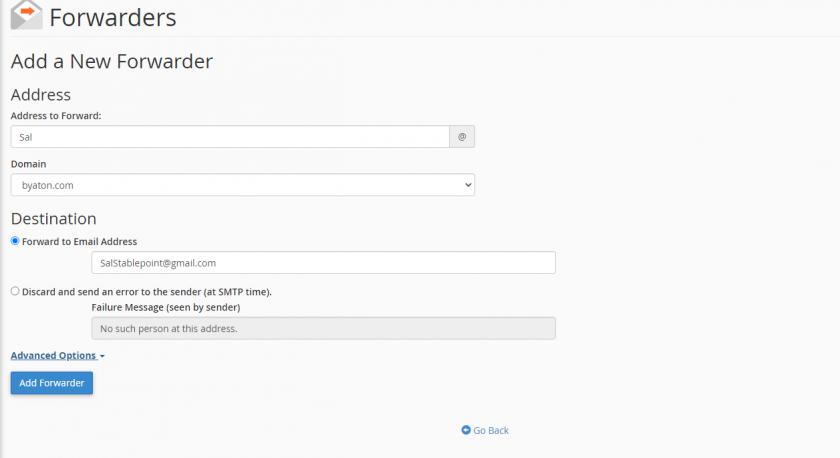
The first part is the email address that you'd like to forward messages, first field is for the username of the mailbox (what comes before @domainname.com) - second field is to choose the domain name this mailbox is under.
-
The next box " Forward to Email Address: " is the email address that you want to forward messages to. It is possible at this point to forward to another email address outside of your hosting with us, such as to a gmail.com or yahoo.com address. However, this is generally not recommended because it has been known for free webmail providers to be overzealous in their spam filtering of messages forwarded in this way.